
AI Discord bot: run your server in one sentence with /ai
/ai is the command at the heart of AiGuild. You write what you want in your own words; it reads your server — channels, roles, activity, tickets, invites — and answers with your real numbers or with a card of proposed changes. Nothing happens until you confirm.
Free plan, no credit card.
It knows your server
“Which channels are dead?” or “who brings in members who stay?” get an answer from your server's own activity counts, invites and tickets, not a generic tip.
It acts once you confirm
Channels, categories, roles, permissions, events, announcements, role panels, giveaways, level rewards, ticket and welcome settings: /ai prepares a card, you press Confirm.
You can undo
A deleted channel, category or role can be restored for 24 hours, with its permissions — and for a role, its members. Actions that can't be undone, like a giveaway draw, say so on the card.
It respects who is asking
/ai only proposes what the person's Discord permissions allow. A member can edit their own profile, join a giveaway or take a role; changing the server is for staff. It never kicks or bans: that stays a human decision.
What /ai looks like in Discord
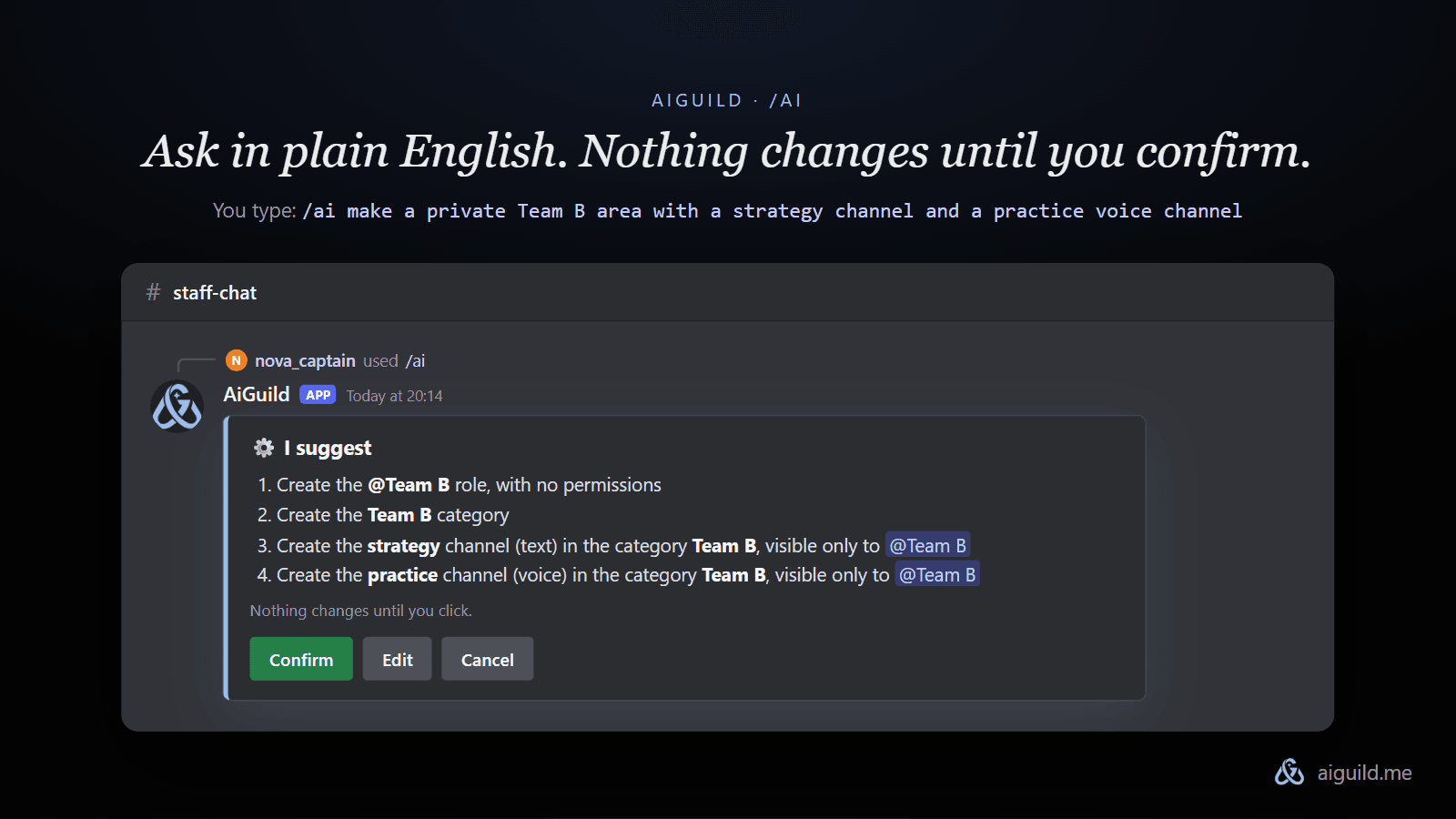
You type a request in your own words. AiGuild answers with a card: what it will do, step by step, with Confirm, Edit and Cancel. Nothing is created, renamed or deleted before you press Confirm.
Real requests, and what /ai answers
Example replies written the way /ai writes them: short, numbers first. On your server, the channels, members and counts are your own. Activity counts need the weekly report or the activity alert switched on.
You
/ai Which channels are dead?

AiGuildAPP
3 channels have had no message for two weeks or more:
- #old-memes: last message 23 days ago
- #voice-text: 19 days
- #suggestions: 15 days (it had about 40 messages a week in September)
I can archive the first two. #suggestions probably needs a pinned message saying what it's for.
You
/ai Launch a Nitro giveaway on Saturday at 8 pm for level 5 and above
AiGuildAPP
Here is the giveaway. Check the date and the prize, then confirm.
⚙️ I suggest
- Start a giveaway in #giveaways: 1 month of Nitro, 1 winner, ends Saturday at 20:00
- Entry condition: level 5 or higher
The draw itself can't be undone once it has happened. The card says so.
You
/ai Who brings in members who actually stay?
AiGuildAPP
Over the last 30 days, @nova_captain brought 14 members, 11 still here.
Your Twitter link brought 22, but only 6 stayed.
Want an invite reward for people who bring in members who stay?
You
/ai Give me the Minecraft role
AiGuildAPP
That role is on the Games panel, open to everyone.
⚙️ I suggest
- Give you the @Minecraft role
It only changes your own roles, so confirming costs nothing.
What's free, and what costs credits
The same rules for every plan, free or paid. Credits are taken only when the AI actually works for you.
- Your first /ai of the week
- Free, actions included. Resets every Monday, for everyone.
- Each question after that
- 3 credits, refunded automatically if the AI fails to answer.
- Confirming changes on the server
- 2 credits per step of up to 6 actions.
- Changes that only concern you (your roles from a panel, your profile)
- Free to confirm.
- Undoing a change
- Free, for 24 hours.
The free plan gives 10 credits every two weeks, with no credit card. Top.gg votes and credit packs add more. VIP and Premium unlock the VIP settings in /ai and renew credits every week.
See all plans →Safe by design
Nothing happens without Confirm
Every change comes as a card. Only the person who asked can confirm it, and a card left unanswered expires after 24 hours.
No Administrator permission
AiGuild's invite asks only for the permissions it uses: channels, roles, permissions, tickets, welcome. Never Administrator, which Discord shows with a warning for good reason.
It follows the asker's permissions
/ai proposes only what the person's own Discord permissions allow. A member can take a role or join a giveaway; changing the server is for staff.
It never kicks or bans
Removing people stays a human decision. /ai can report, suggest and set up protection, not punish.
It doesn't read your messages
The public bot has no access to Discord's Message Content. /ai works from structure and counts: how many messages per channel, not what they say.
Every action is logged, and undoable
A 30-day log lists each confirmed action and who confirmed it. A deleted channel, category or role comes back for 24 hours, with its permissions and, for a role, its members.
/ai is not a Discord chatbot
Many “AI Discord bots” are chatbots: they talk with members in a channel. /ai is an assistant for the people who run the server. It knows your server and changes it, after you confirm.
| AiGuild /ai | A typical AI chatbot | |
|---|---|---|
| What it knows | Your server: channels, roles, permissions, activity counts, invites, tickets | General knowledge, plus the conversation in front of it |
| What it does | Creates and changes channels, roles, giveaways, levels, welcome and ticket settings | Writes replies |
| Who it's for | Owners and staff, and members for their own roles and profile | Everyone chatting in a channel |
| Your messages | Not read: no Message Content access | Usually read, since it has to answer them |
| Safety | A card to confirm, a log, 24-hour undo | Nothing to confirm: it only talks |
If you want a bot that chats with your members for fun, AiGuild is not that. If you want the server itself handled in one sentence, it is.
Ask /ai
Real requests /ai knows how to handle. It shows the changes; nothing happens until you confirm.
- /ai Create a private Staff category with a #mod-log channel
- /ai Launch a Nitro giveaway on Saturday at 8 pm for level 5 and above
- /ai Which channels has nobody written in for two weeks?
Set it up in three steps
- 1
Add AiGuild to your Discord server.
- 2
Type /ai in any channel and write your request in your own words.
- 3
Read the card of proposed changes and press Confirm — or ask for something else.
Starting from an empty server?
/ai changes a server that already exists. To build a whole AI Discord server in one go — categories, channels, roles, permissions, with tickets, levels, welcome and protection set up — describe it to the generator first. /ai takes over from there.
Generate a Discord server with AI →Common questions
Is /ai free?
For everyone, free or subscribed: 1 free /ai question every week, then 3 credits per question. Confirming an action card costs 2 credits per step, except in the free question.
Does /ai read our messages?
No. AiGuild's public bot doesn't have Discord's Message Content access. /ai works from your server's structure and from counts — how many messages per channel and per hour — never their text.
Can I use it outside Discord?
Yes: the bar on the AiGuild homepage and dashboard asks the same assistant, with the same rules and the same confirmation step.
What can /ai do on a Discord server?
Answer questions about your server with its real numbers (quiet channels, departures, who brings members who stay, ticket waiting times), and prepare changes you confirm: channels, categories, roles and permissions, events, announcements, button roles, giveaways, level rewards, ticket, welcome, rules and protection settings.
Who can use /ai?
Every member, within their own Discord permissions. Staff can change the server; a member can ask questions, take a role from a panel, join a giveaway or edit their AiGuild profile. You can also mention @AiGuild in a channel or send it a DM.
What if /ai gets it wrong?
Press Edit and say what to change, or Cancel. After confirming, a deleted channel, category or role can be restored for 24 hours from the card or the log, at no cost.
Does /ai work in my language?
Yes. Write in your own language; announcements and welcome messages are written in your server's language.
Free plan, no credit card.
Checked against the bot's code on 2026-11-04.